Imagine you work at an online clothing store. Every day, thousands of product photos arrive and someone needs to tag each one: is it a t-shirt? A sneaker? A bag? Doing this by hand is painfully slow, so you decide to teach a computer to do it for you. That’s exactly the kind of problem Fashion MNIST was designed to solve — and it’s a perfect first project to understand how neural networks learn to see.
What follows are notes from building a simple image classifier with TensorFlow and Keras, step by step.
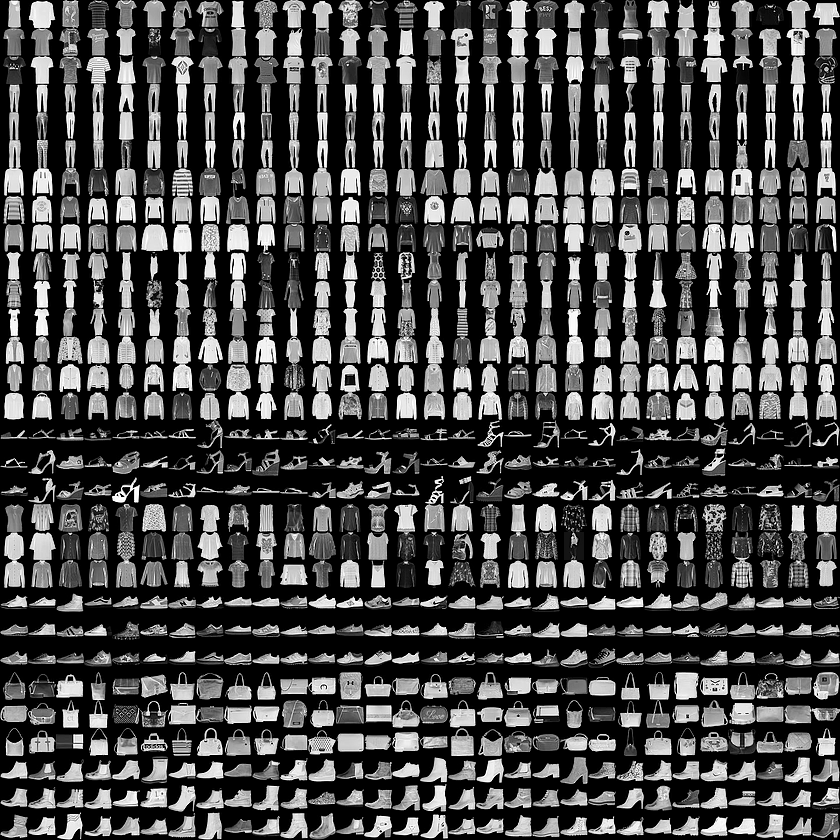
Dataset overview
- The dataset returns two tuples (two immutable lists, in math parlance).
- The data is split into training and testing sets, separating the two groups for different use.
- The training set contains 60,000 images, and the test set contains 10,000 images.
- Each image has a shape of 28 × 28 pixels.
- You can use a Python library to visualize the data:
import matplotlib.pyplot as plt- Images are identified by a number that maps a label to a class.
- In Fashion MNIST, there are 10 classes: T-shirt/top, Trouser, Pullover, Dress, Coat, Sandal, Shirt, Sneaker, Bag, Ankle boot.
Input shape and flattening
Think of each image as a small grid of 28 rows and 28 columns. The neural network, however, expects a flat list of numbers — not a grid. So the first thing we do is flatten that grid into a single line of 784 values (28 × 28 = 784).
The input shape defines the image size. A Flatten layer converts each 2D image into a 1D vector so it can be passed into dense layers.
keras.layers.Flatten(input_shape=(28, 28))This transforms the data from 28 × 28 into 784.

Dense layer
Now that the image is a flat list, it enters a dense layer — a fully connected layer, meaning every neuron in one layer connects to every neuron in the next layer. Everyone talks to everyone.
keras.layers.Dense(256, activation=tensorflow.nn.relu)The exact number of neurons is flexible. 256 is just a common and practical choice for a simple baseline model.
What this model is doing
Back at our imaginary clothing store: the model receives a photo, flattens it, runs it through layers that learn to recognize patterns (edges, shapes, textures), and finally outputs its best guess for which of the 10 clothing categories the photo belongs to.
1. Flatten the 28 × 28 images
The model first converts each image into a one-dimensional vector.
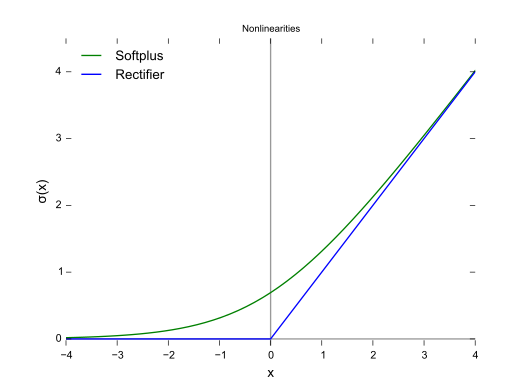
2. Apply ReLU
ReLU introduces non-linearity, which allows the network to learn more complex patterns. Without it, stacking layers would still behave like a single linear transformation — the model couldn’t separate patterns that aren’t divided by a straight line.
tensorflow.nn.reluWith additional layers, the model gains more representational capacity. Some people only refer to a network as “deep” when it has multiple hidden layers.
3. Apply dropout
A dropout rate of 0.2 means that 20% of the units are randomly ignored during training, which helps reduce overfitting. It’s like randomly sending some employees home each day — the remaining team can’t rely on specific individuals and becomes more resilient.
keras.layers.Dropout(0.2)4. Use softmax in the output layer
Softmax converts the final outputs into probabilities across the 10 classes. The output probabilities must sum to 1.
keras.layers.Dense(10, activation=tensorflow.nn.softmax)Model example
keras.Sequential([
  keras.layers.Flatten(input_shape=(28, 28)),
  keras.layers.Dense(256, activation=tensorflow.nn.relu),
  keras.layers.Dropout(0.2),
  keras.layers.Dense(10, activation=tensorflow.nn.softmax)
])
This model:
- Flattens the image
- Applies a dense hidden layer with ReLU
- Uses dropout to reduce overfitting
- Outputs class probabilities with softmax
Why ReLU matters
ReLU helps the model learn non-linear decision boundaries.
Without a non-linear activation function, stacking layers would still behave like a single linear transformation, which would severely limit what the model can learn.
In simple terms: ReLU enables non-linear separation — it helps the network separate patterns that cannot be split with a straight line.
Output layer
The final layer is:
keras.layers.Dense(10, activation=tensorflow.nn.softmax)Why 10? Because Fashion MNIST has 10 classes, and the model must output one probability for each class.
Compile before training
Before calling fit, the model must be compiled:
model.compile(
  optimizer='adam',
  loss='sparse_categorical_crossentropy',
  metrics=['accuracy']
)
Explanation
- Adam is a commonly used optimizer, especially for multiclass problems, and works well as a default starting point.
- Sparse categorical crossentropy is appropriate for multiclass classification when labels are integer-encoded.
- Accuracy is an intuitive metric for checking how often predictions are correct.
In general: lower loss suggests better optimization, higher accuracy suggests better predictive performance.
Train the model
Then train the model with fit. How much to train depends on the problem — you only know by testing:
history = model.fit(
 train_images, train_labels,
 epochs=5,
 validation_split=0.2
)
Notes
- Compare train vs validation performance.
5epochs is a reasonable starting point for a simple baseline.- More epochs can help, but they can also lead to overfitting depending on the dataset.
- A validation split helps you observe whether the model generalizes beyond the training data, e.g.
validation_split=0.2.
Visualizing predictions
After training, use the visualization library to inspect predictions and see if they match the expected class.
This helps answer questions such as: Did the model predict the correct class? Was the prediction confident? Which classes are being confused with each other?
A simple classifier may still confuse visually similar classes such as Shirt vs T-shirt/top, Sneaker vs Ankle boot, or Pullover vs Coat.
Minimal end-to-end example
import tensorflow as tf
from tensorflow import keras
import matplotlib.pyplot as plt

fashion_mnist = keras.datasets.fashion_mnist
(train_images, train_labels), (test_images, test_labels) = fashion_mnist.load_data()

model = keras.Sequential([
   keras.layers.Flatten(input_shape=(28, 28)),
   keras.layers.Dense(256, activation=tf.nn.relu),
   keras.layers.Dropout(0.2),
   keras.layers.Dense(10, activation=tf.nn.softmax)
])

model.compile(
   optimizer='adam',
   loss='sparse_categorical_crossentropy',
   metrics=['accuracy']
)

history = model.fit(
 train_images,
 train_labels,
 epochs=5,
 validation_split=0.2
)

test_loss, test_acc = model.evaluate(test_images, test_labels)
print('Test accuracy:', test_acc)